Forum Replies Created
-
AuthorPosts
-
April 26, 2013 at 8:28 am in reply to: Making buttons visible & slider not showing on all pages #1208
 satoriKeymaster
Thank you, Denis, doing me best :)
A.
satoriKeymasterHey Lionfuse,
the website seems to be offline. Could you please check?
Sincerely,
Andrew | Satori StudiosatoriKeymasterGreat to hear, Chris! :)
In case of other issues/questions, do not hesitate to contact me.
Sincerley,
Andrew | Satori StudiosatoriKeymasterHey Lionfuse,
first of all, thank you for the purchase!
Please provide the URL of the page in question; also, I’d need to know which options you have as marked in the “Settings -> Permalinks” admin menu.
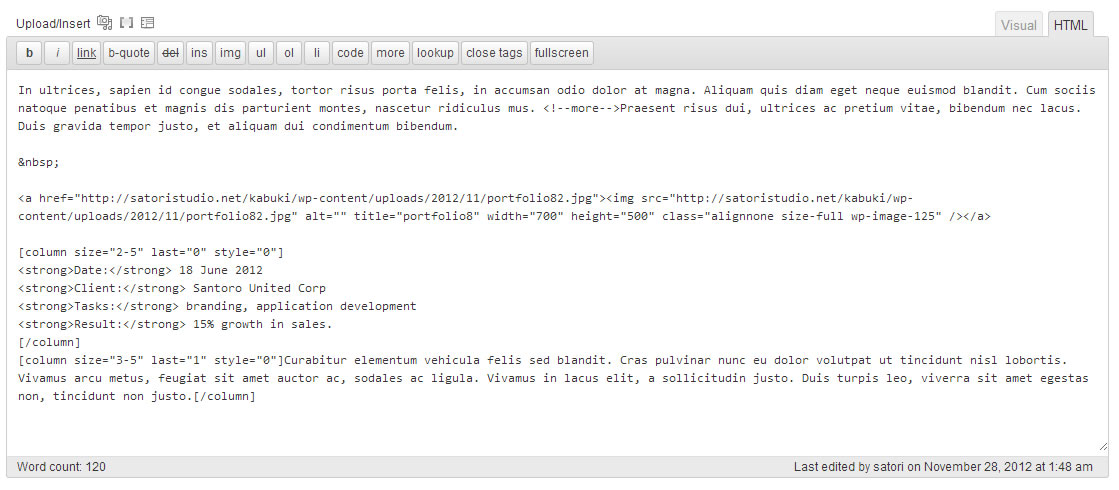
Regarding the format of the project pages – indeed, I’ve used the [column] shortcodes in the demo to make them look more structured and “lifelike”. Here’s the screenshot of the content.
Sincerely,
Andrew | Satori StudiosatoriKeymasterDear Jimmy,
could you please provide the URL of the page in question? I will take a look at the code.
Sincerely,
Andrew | Satori StudiosatoriKeymasterHey Jimmy,
first of all, thank you for the purchase!
Please try adding this piece of CSS: .home #main-body #content { margin-top: 0 !important; padding-top: 0 !important; }
Sincerely,
Andrew | Satori StudiosatoriKeymasterHey Chag,
first of all, thank you for the purchase!
I’ve run a couple of tests using Pingdom and it looks like your website (test) is getting a higher speed score than the Fuji demo (test). It does take longer to load, though, mainly because of four files which you can see as long yellow bars on the diagram below the scores. 4 seconds is usually considered a normal loading speed for a page with multiple images, yet in case you want to try to increase it further the places to look are:
– check the Minify plugin you likely have installed, it is one of the problem zones; try disabling it and re-running the test.
– if you’re not using the image slider on your website, you can get rid of the “orbt-1.2.3.css” file altogether – by going to “Appearance -> Editor” admin menu, opening the “header.php” file on the right, locating (Ctrl+F) the line which contains the full name of this file and deleting it (do not forget to press “Update File” to save the changes).
– you can also get rid of the fancybox function (the one that creates overlays if you click on one of the post images) – by downloading this custom file from my repository, unzipping it, and uploading the contained file into the theme folder via ftp (/wp-content/themes/Fuji).
– there’s not much we can do about lessframework.css, since it contains important style declarations which among other things make the website adapt to the screen size of smaller viewing devices like tablets and smartphones.I hope this was helpful!
Sincerely,
Andrew | Satori StudiosatoriKeymasterGlad it works, thanks for the detailed follow-up!
Should anything else pop up, do not hesitate to contact me.
Best,
Andrew | Satori StudiosatoriKeymasterHey Léo,
First of all, thank you for the purchase!
The code seems fine from the outside (i.e. the rendered HTML/CSS), and the latest post (the one about Google Glasses) does contain a featured image, yet the slider does not display the image for that one. This hasn’t been reported before, thus I will need to ask you for login details so that I can look at the php and the back-end. You can send login credentials to support@satoristudio.net (no disclosure guaranteed).
Regarding the categories on the right – could you please clarify, as I do not see any errors on my machine. Thank you!
Sincerely,
Andrew | Satori StudiosatoriKeymasterHey Telltree!
First of all, thank you for the purchase!
Looking at the error message, it seems that the source of the error might be your hosting provider’s settings (see e.g. this post on the WordPress.org website). Please let me know how the reinstall goes!
Sincerely,
Andrew | Satori Studio -
AuthorPosts